If you are coming from Windows background, you are probably aware of how convenient it is to lock your computer with one hand (2 finger gesture) before leaving your desk or computer.
It is “Windows + L” by default… How nice it is, eh?
Yes, I agree. It is very nice and also very convenient, especially considering locations of those 2 buttons on the keyboard. 2 fingers of one hand is enough to lock your computer and walk away.
In Mac realm, however, keyboard shortcut of computer/screen lock is not so great if you use your Mac with default settings.
It is “Control + Command + Q“… You might thinking: “Well, Control and command keys are ok, what’s up with Q? What does even that stand for”.
Admittedly, it is not very intuitive and doing it with one hand is not easy enough if not possible.
HOWEVER, there is a way out.
Worry not!
One can create custom keyboard shortcut on MACs, though it is not very well known and used feature.
Here are the steps towards freedom of walking away from your desk/computer after locking your screen/computer with one hand (which is something I’ve always found to be very eloquent 🙂 )
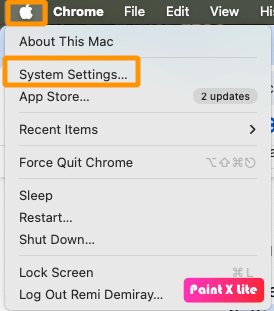
Step 1: Open MAC System Settings
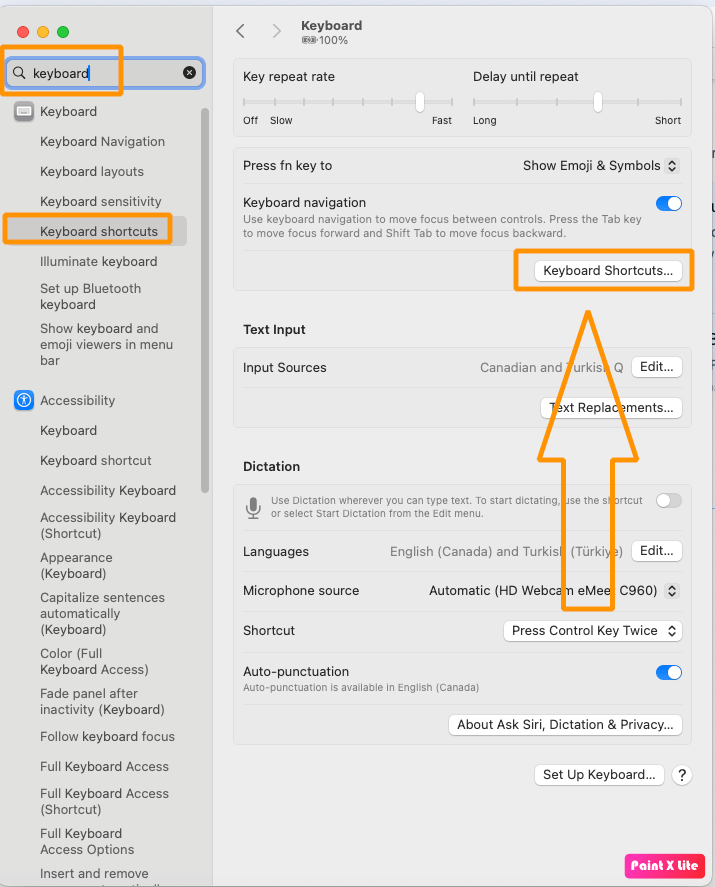
Step 2: Search and find keyboard shortcuts
Step 3: Adding Application Shortcut
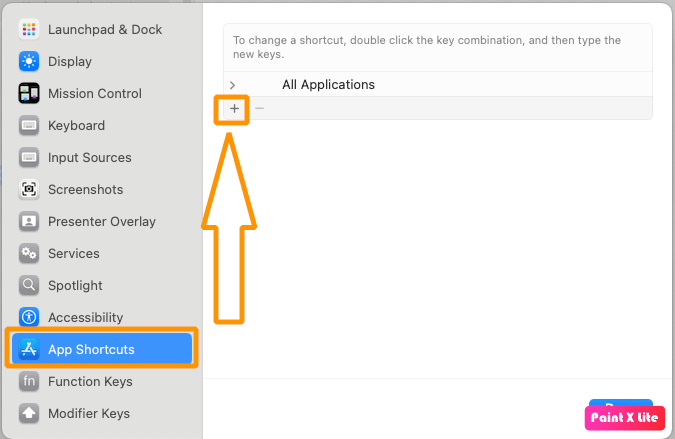
Click on “App Shortcuts” and then click on “+” icon as shown in the figure above.
From the opened dialogue, fill in the 3 options as shown in the figure below.
Note that you should not do any typo in “Menu title” as it is free text box. In this case, you should fill it in with “Lock Screen” key phrase.
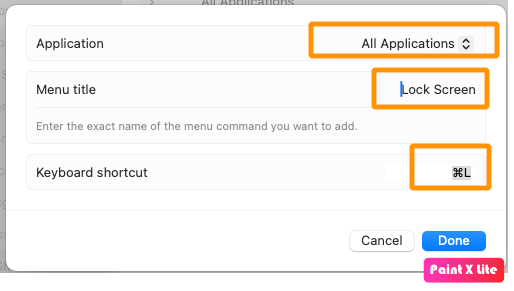
After selecting options and filling in all 3 fields, hit “Done” button.
If you directly open up Mac menu, you may not see that newly defined shortcut shows up there. You may need to log out and back in. Or simply lock the screen and log back in.
Done!
Enjoy locking your Mac’s screen with one hand!
=> “Command + L“
Very intuitive, easy to do with one hand…
Yet, as a bonus, your muscle memory will be very familiar with it if you are coming from Windows background.
Hope it helps.





Leave a Reply